voice AI for events
Voice AI for events: what changes when the install only has to last three days
Voice AI for events runs on borrowed networks, borrowed power and two minutes of training. What a three day install demands that a permanent one never does.
August 28, 2026 10 min read
A permanent install rewards patience. You can spend an afternoon on cable routing, come back the next morning to adjust, and let the whole thing settle over a fortnight. Voice AI for events has none of that: the load-in window is short, the venue is one you have never stood in, and the deployment has to work before doors open and be gone by Sunday night. That single constraint rewrites almost every decision you would otherwise make slowly.
Voice AI for events means running a voice agent inside a temporary deployment, where hardware goes up in hours, the network and power belong to somebody else, and the people using the system get a briefing rather than training. The speech to text, models and text to speech still run on the operator's own backend, exactly as they would in a permanent install.
The short version
- Setup speed dominates a temporary deployment, because a device taking twenty minutes to bring online costs a morning across six positions.
- QuickComm devices are provisioned by scanning a QR code from the console, which is what makes on-site re-provisioning practical when the promised network turns out not to exist.
- Venue Wi-Fi is the most likely thing to fail, so an endpoint on a machine you carry is usually a safer design than anything depending on the building's uplink.
- The Bridge Node plugs into any 3.5 mm and 2.5 mm two-pin audio jack and sits inline, so an agent joins the radios, intercoms and PA the venue already runs instead of replacing them.
- The Table Top has a 1000 mAh internal battery and USB-C, enough to ride out a socket being unplugged and moved rather than turning that into an outage.
- Nothing intelligent happens on the device: capture is 16 kHz mono over 2.4 GHz Wi-Fi or BLE, and every model stays on the operator's backend.
Why is a three day install a different problem?
The clock is the difference, and it changes what counts as good design. A permanent deployment amortises setup over months, so an hour of fiddling per position is invisible. Voice AI for events pays the whole bill up front, in a loading bay, beside a half-built stand, with somebody else's contractor drilling nearby.
The counter-narrative worth stating is this: most people plan an event deployment as though the hard part were the agent. The hard part is the ninety minutes between the van doors opening and the first rehearsal, and the agent has almost nothing to do with it.
Provisioning speed decides your load-in
Provisioning is where a load-in is won or lost, because it is the only cost that multiplies by the number of positions. Scanning a QR code from the console to put a unit on a network and point it at an endpoint brings the per-device cost close to nothing.
Plan for re-provisioning rather than provisioning. At an event you do it twice: once at home to prove the deployment works end to end, and once on site, when the SSID you were given belongs to a network that does not reach the far corner of the hall.
The units arrive pre-flashed with QuickComm firmware, so there is no image to build and no serial terminal in a flight case. Bring every device to the same build with OTA firmware updates before leaving the workshop, then leave firmware alone. A show is not the place to push changes to devices you cannot reach.
What is most likely to fail at a venue?
The venue network, by a wide margin. In a hall with two thousand phones in it, 2.4 GHz is congested by definition, the guest network may sit behind a captive portal, and the only person who could change anything about it is not on site this weekend.
Some of that you can mitigate. Bring your own access point and put your devices on it rather than the guest SSID, know the credentials before load-in, and test at the actual position rather than the door, because one wall is the difference between working and not.
The venue uplink is what you cannot mitigate, which leads to the decision that saves most temporary deployments. QuickComm devices stream to whatever endpoint is configured, and that endpoint can be a LAN server, so a laptop in a flight case makes the audio path a local hop.
What happens after that hop depends on your own choices. If your models run on the machine you brought, an uplink failure changes nothing. If your backend calls a hosted API, you are still down, so decide which of those you have built before you get in the van rather than at 8am on show day.
Attaching to the radios and PA a venue already runs
Most venues and most crews already have a working voice system, and it is not the one you brought. It is two-way radios, a radio headset per steward, an intercom, or a PA rack in a cupboard, in use for years, known to everybody, and not being swapped for something new over a weekend.
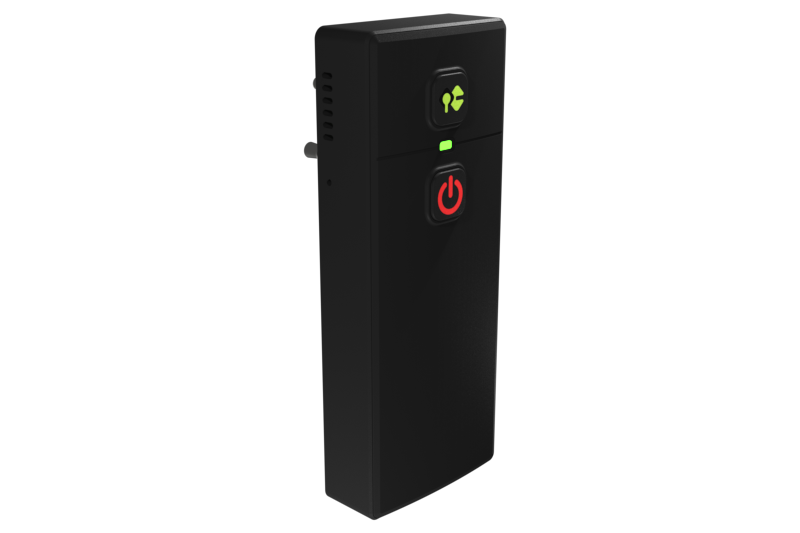
The Bridge Node exists for exactly that situation. The unit clips to a belt and plugs into any 3.5 mm and 2.5 mm two-pin audio jack, the connector found on a large share of two-way radios, radio headsets, intercoms, PA systems, desk phones and consoles. It sits inline, so the host device carries on working as before, and it is two-way: mic and speaker, so your agent can hear the channel and answer onto it.
That arrangement is the strongest argument for hardware at an event. Your agent joins the system the show is already running, the training cost is close to zero, and the crew's kit is unchanged. Nobody has to be persuaded to carry a second device on an already full belt.
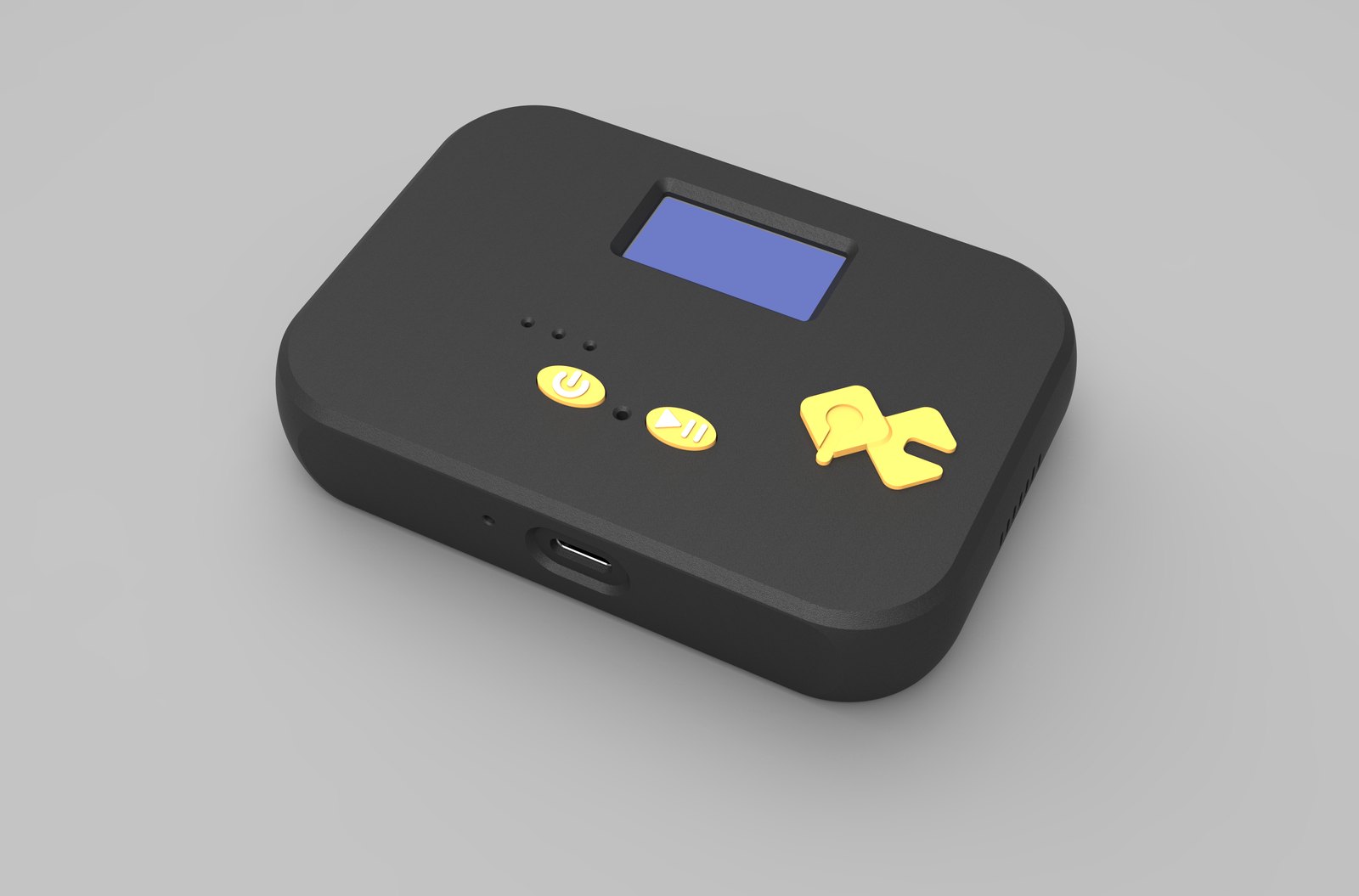
Where the requirement is room capture rather than channel capture, the Table Top is the counterpart. It sits on a desk or mounts on a wall, its mic is tuned for table distance, and its display shows network, firmware and assignment, which earns its keep when you check six positions in a hurry before doors.
Power you do not control, and kit that survives a van
Assume you will lose at least one position to a power problem during the show. The socket is where the socket is, it may be shared with a fridge or a lighting desk, and cables get taped down, untaped by somebody else and re-routed by a third party who never mentions it.
The Table Top charges over USB-C and holds a 1000 mAh internal battery, which covers a socket being moved rather than letting that become an outage. The Bridge Node also runs on USB-C. Neither replaces a plan, so bring more cables than you think you need and label everything, because at 8am nobody can tell your cables from the venue's.
The rest is packing discipline, which matters because hardware gets thrown in a case, driven across a city, carried down a service corridor and dropped at least once.
- Pack one complete spare position rather than spare components, so a failure is a swap and not a repair on a carpet tile.
- Provision the spares at home so they join the network without a laptop and a quiet corner.
- Photograph each position once it works, so anybody on the crew can rebuild it without finding you first.
- Write down which endpoint each device is pointed at, and keep that list somewhere other than the laptop it depends on.
How much training will a steward actually get?
About two minutes, in a briefing already running late. The person using the system is a stage manager, a steward or a volunteer, and anything needing more explanation than that will not be done correctly, which is not their fault.
Two minutes is the strongest case for push to talk hardware in temporary deployments. A physical button is a complete mental model: hold it, speak, release. No wake word to remember or mispronounce, no ambiguity about whether the device is listening, and no pause while somebody waits to find out.
The framing helps you as well as them. Silence is never streamed, so a device on a busy stand is not shipping the whole hall to your backend, and pre-roll buffering means the first syllable survives when somebody talks a fraction before pressing.
Write the briefing as one sentence and test it on somebody who has never seen the device. If they need a second sentence, simplify the deployment rather than the explanation.
What this hardware does not do
- No AI runs on the device beyond voice activity detection, so transcription, translation and language support belong to the models you run, from Whisper to OpenAI Realtime to a local Ollama install.
- No ingress protection rating is claimed, which is worth knowing before an outdoor stage in November.
- Wi-Fi is 2.4 GHz only, which is the worst band to be limited to in a crowded hall, and there is no version of this hardware that fixes a venue's network for you.
- Capture is 16 kHz mono, correct for speech and wrong for anything musical coming off a desk.
- The backend and its uptime are yours, the 12-month warranty excludes physical damage, and returns run for 7 days, shorter than the gap between many show cycles.
Nobody should buy this hardware for an event that amounts to one person at one table for one afternoon. A laptop and a decent USB microphone will do that job for nothing. QuickComm publishes this article and would rather say so here than have somebody discover it in a loading bay. Equally, if your agent only needs to hear a presenter on stage, take a feed from the sound desk, because the best microphone at an event is the one the engineer already aimed.
Common questions
Does voice AI for events need internet access at the venue?
Not necessarily. QuickComm devices stream to whatever endpoint is configured, and a LAN server on a machine you bring is a valid target, so the audio path can be entirely local. Whether the system survives an uplink failure depends on your stack: local models keep working, a hosted API does not.
Can an agent join the two-way radios a crew already uses?
Yes, and that is usually the better plan for a short deployment. The Bridge Node plugs into any 3.5 mm and 2.5 mm two-pin audio jack and sits inline, so the radio, intercom or PA keeps working as before. Being two-way, it lets the agent hear the channel and speak back onto it without anybody changing habits.
How long before a show should hardware be ordered?
QuickComm devices are built to order and ship in 10 days worldwide, so order well ahead of load-in rather than the week of the show. Buyers pay import duties on arrival under DAP terms, which is another reason to leave slack in the calendar rather than counting on a courier.
How many positions justify dedicated hardware at an event?
Roughly the point where one laptop stops covering the floor. Dedicated hardware earns its price when several positions run at once, when somebody moves around with their hands full, or when the agent needs to be on the crew radio channel. Volume discounts begin at five units, about where a multi-position deployment lands anyway.
Planning a show around the hardware
The work that decides a temporary deployment happens before the van is loaded: knowing your endpoint, your network, and which position you are most likely to lose. Everything else is packing.
The Table Top is $200 and the Bridge Node is $250, both built to order with a 10 day lead time and a 12-month warranty. Read the product pages for the full specification, then choose on whether the show needs a room heard or a channel joined, because those are different jobs and only one is solved by putting a microphone on a table.