self-hosted meeting recorder
Building a self-hosted meeting recorder: the hardware half of owning the whole path
A self-hosted meeting recorder keeps capture, transport and transcripts in your own systems. Here is what the hardware must do, and when a laptop app wins.
August 10, 2026 9 min read
Legal will not approve a notetaker that uploads client meetings to a service nobody in the building controls. That objection ends more meeting AI projects than any accuracy problem does, and it points at a different shape of build: a self-hosted meeting recorder, where the microphone, the receiving endpoint and the transcript store all belong to you. QuickComm publishes this guide because the hardware layer of that build is usually the layer teams plan last.
A self-hosted meeting recorder is a recording and note taking chain in which every stage, from the microphone in the room through to the stored transcript, runs on hardware and servers the operator controls, with no third-party service holding the audio at any point.
The short version
- QuickComm sells voice AI development kits rather than a notetaking service, so the devices capture audio and stream it to an endpoint the buyer configures.
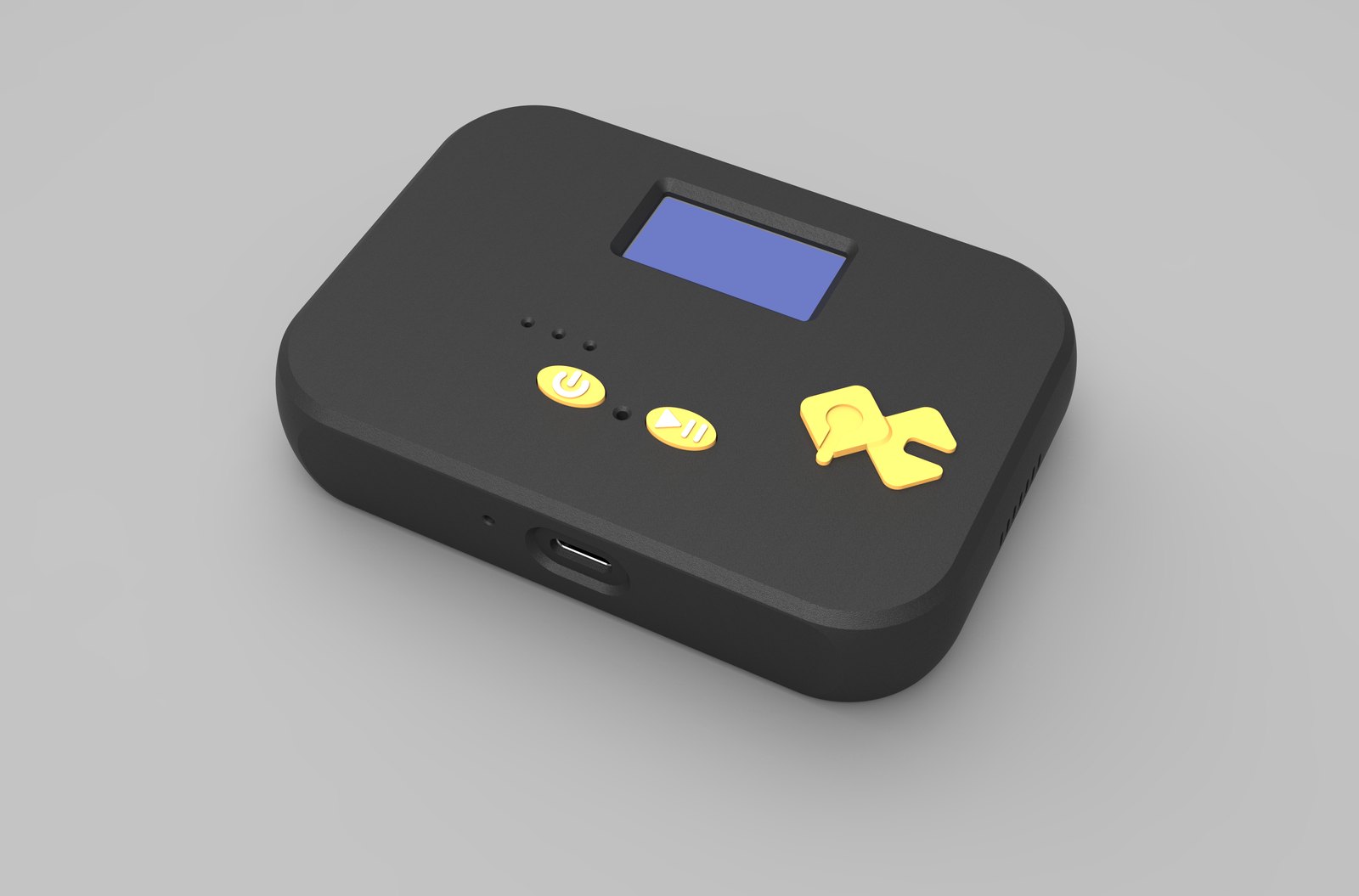
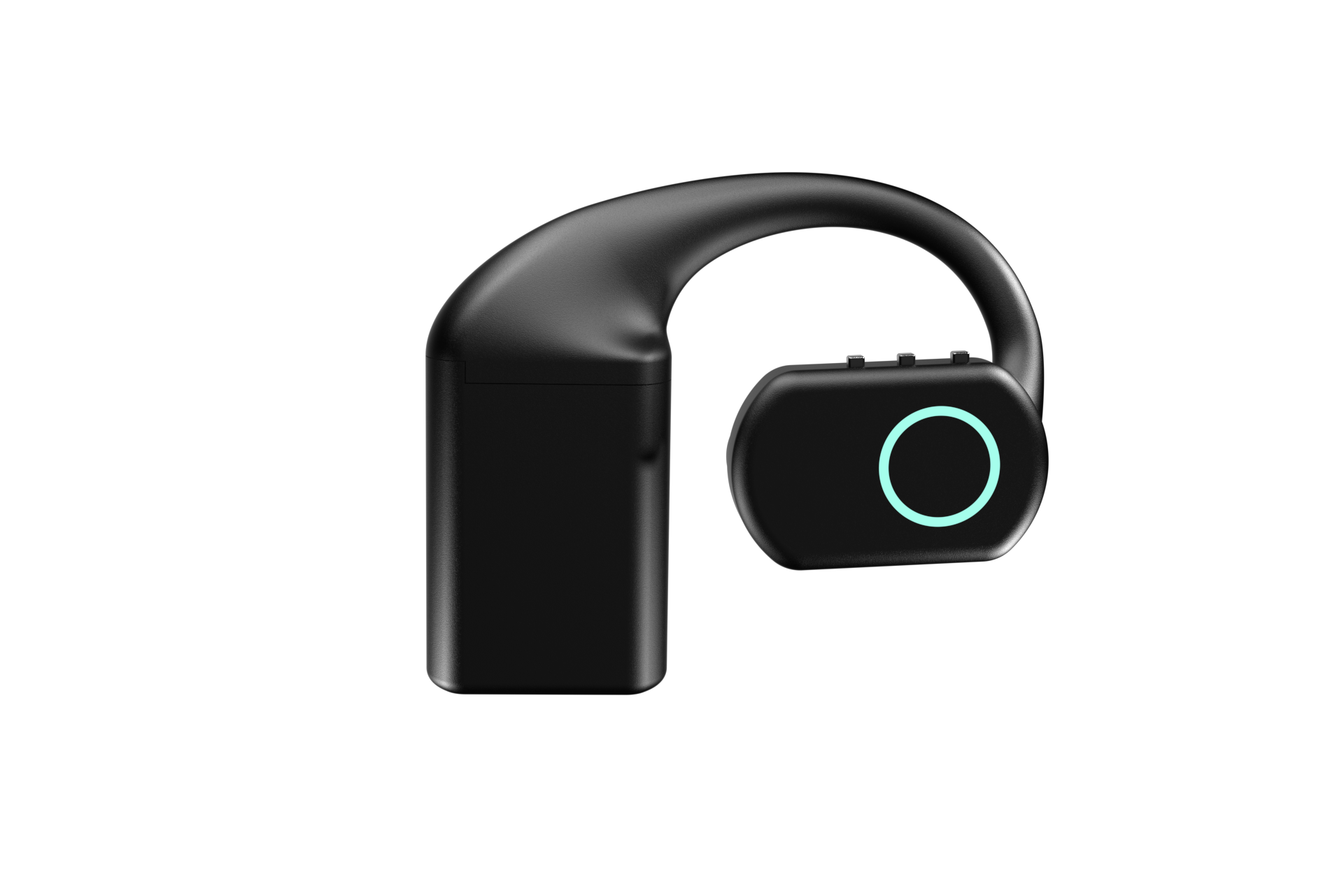
- The QuickComm Table Top is a $200 desk or wall unit with a microphone tuned for table distance, and the QuickComm Earpiece is a $350 over-ear wearable with a MEMS mic.
- Speech to text, summarising and storage run entirely in the buyer's own stack, on Whisper, Deepgram, OpenAI Realtime, ElevenLabs, a local Ollama model or any other combination.
- Both devices capture 16 kHz mono PCM through a 24-bit codec and send it over the loss-tolerant udp-v1 wire protocol, and silence is never streamed.
- Once a device is configured it streams straight to the buyer's endpoint, which can be a server on the buyer's own LAN, and does not depend on the QuickComm console to keep operating.
- Units are built to order, ship worldwide in 10 days, and carry a 12-month warranty that excludes physical damage.
What does owning the whole audio path actually involve?
Owning the whole path means taking responsibility for five separate stages, and most teams only think about the middle two. Capture is getting usable speech out of a room. Transport is moving that speech to a machine you control over a network you control.
Recognition turns the audio into text, and diarisation tells you who said which part of it. Understanding is whatever your model is prompted to produce: a summary, a decision log, a list of actions. Storage and retrieval decide where transcripts live, who can read them and how long they survive.
QuickComm occupies the first two stages and none of the others. The devices are dev kits that capture and stream, and every stage from recognition onwards runs in your backend, wherever you choose to put it.
The device captures and streams, and stops there
Each unit arrives pre-flashed with QuickComm firmware and does exactly one job. A 24-bit codec captures 16 kHz mono PCM. On-device voice activity detection and push-to-talk framing keep silence off the wire, and pre-roll buffering means the first syllable of a sentence survives even when somebody starts talking before the button is fully down. The udp-v1 wire protocol is loss tolerant, so a congested office network degrades a session instead of ending it.
A belief worth arguing with: the microphone is widely treated as the commodity part of a meeting AI build, the bit you solve with whatever is already on the desk. Capture is in fact the only stage where quality lost is lost permanently. No summariser recovers a sentence that arrived as mush, and teams routinely spend weeks tuning prompts to compensate for several metres of empty table.
Nothing on the device transcribes, translates, labels speakers or summarises anything. Voice activity detection is the only processing that happens on the hardware, and inference of every kind happens on your backend. Language coverage is whatever your models support, and no capture device changes that.
How do you point capture at a server you run?
The stream endpoint is configurable from the QuickComm console, so the address audio travels to can be a box in your own rack, a virtual machine on a private segment, or a small server sitting in the same building as the meeting room. Locally the device connects over BLE. Over Wi-Fi, which is 802.11 b/g/n on 2.4 GHz, the device streams to whatever endpoint has been configured, and a LAN address is a valid endpoint.
Provisioning happens by QR code in three steps from the console, and docs live in the console with your account. After that step the relationship changes shape: a configured device streams directly to your endpoint and does not depend on the console to keep working. That independence is the property that decides whether a self-hosted meeting recorder is genuinely self-hosted at the moment somebody presses record.
Fleet management stays available without sitting in the audio path. OTA firmware updates, remote commands and health telemetry let you look after twelve rooms without walking to twelve rooms, and there are no per-channel fees and no platform lock-in attached to any of it.
Recognition, summarising and retention are your stack's job
Everything interesting about the product you are building happens after the audio arrives. Whisper on a GPU box, a Deepgram account, an OpenAI Realtime session, a local Ollama model writing the summary, ElevenLabs if the system should answer out loud: the hardware has no opinion about any of those and hands you PCM regardless.
Running that yourself costs more work than signing up to a hosted notetaker, and pretending otherwise helps nobody. You own the queue, the retries, the transcript schema, the access rules, the retention policy and the afternoon somebody asks for one specific meeting to be deleted. In exchange, the recording never sits on infrastructure you cannot inspect.
When is a laptop application the better answer?
A laptop application is the better answer whenever the meetings that matter are video calls and your data policy permits local capture of system audio. The machine is already in the meeting, already knows who joined, and can record both sides of a remote conversation without any hardware purchase at all. A desktop capture tool writing into storage you own is a legitimate self-hosted meeting recorder and a considerably cheaper one.
The same argument covers occasional in-person meetings. A phone on the table running a local recorder, or a USB conference microphone plugged into the laptop somebody brought anyway, will carry a small team a long way. Buy dedicated capture when the pattern repeats often enough that somebody forgetting to press record becomes a real cost.
Where a fixed room unit earns its place
Dedicated hardware starts to pay when the speech is in the room rather than in the call. A design review at a whiteboard, a supplier walked around a warehouse, a site meeting where no laptop is open, a standup in a room with no fixed machine in it: in each case the laptop is shut, absent, or several metres from whoever is talking.
Fixed hardware also makes capture a property of the room rather than of an individual login. A unit on the wall is provisioned once, belongs to the space, and shows network, firmware and assignment on its own display, which beats asking the right employee to remember the right application every Tuesday.
| Question | QuickComm Table Top | QuickComm Earpiece |
|---|---|---|
| Position | Desk or wall unit in the room | Worn over the ear |
| Microphone | Tuned for table distance | MEMS mic close to the mouth |
| Power | 1000 mAh internal battery and USB-C | Three hot-swap 700 mAh packs, about 8 hours each |
| Controls | Two physical buttons, LED, speaker, status display | Three physical buttons, RGB LED, no touch surface |
| Best for | Seated meetings around one table | One person moving through a working day |
| Price | $200 | $350 |
Hybrid rooms need both halves of the audio. Your call platform supplies the remote participants, a room microphone for AI supplies the people physically present, and merging the two into a single transcript is engineering you own: timestamp alignment, a rule for which source wins when a voice appears twice, and consistent speaker labels across both. Budget for that work rather than discovering it after the first pilot.
What this hardware does not do
- The device runs no AI of any kind. Voice activity detection is on-device, and speech to text, summarising and every model call happen on your backend.
- No ingress protection rating is claimed for any unit, and the 12-month warranty excludes physical damage.
- Wi-Fi is 802.11 b/g/n on 2.4 GHz only, which matters in offices where the carefully managed estate is the 5 GHz one.
- Capture is 16 kHz mono PCM, correct for speech and not intended as a music or archival master.
- Silence is never streamed, so your endpoint receives framed speech rather than one continuous room recording, and assembling a single file per meeting is your job.
- You own the backend and its uptime, including the storage, the retention rule and the consent notice the room needs.
Anyone whose meetings are all remote, whose policy allows a hosted notetaker, and who has no plans to run their own recognition should not buy this hardware. A hosted notetaker service will serve them faster and for less money, and honesty about that is more useful than a sale.
Common questions
Does a self-hosted meeting recorder need the internet at all?
The audio path does not, provided your endpoint is a server on your own LAN. QuickComm devices stream to whatever endpoint is configured, and after setup they keep streaming there without depending on the console, so a room, a device and a local server form a complete loop. Provisioning and firmware updates are the parts that expect connectivity.
Can one device cover a meeting room and a person on the move?
Room capture and personal capture are different acoustic problems and the two QuickComm units are built for one each. The Table Top has a microphone tuned for table distance and sits in the room, while the Earpiece keeps a MEMS mic at a constant distance from one mouth all day. Teams running both usually assign devices per space and per person rather than trying to make one unit do both jobs.
Which speech to text should a self-hosted build use?
QuickComm hardware is agnostic and stays out of that decision entirely. Whisper, Deepgram, OpenAI Realtime and local models under Ollama all accept audio from the same devices, because what arrives at your endpoint is plain 16 kHz mono PCM. Choose on the constraint that actually binds you, whether that is accuracy, cost, or the rule that says nothing leaves the building.
How many units make sense for a first pilot?
One room and one device is enough to answer the only question that matters early, which is how your recognition stack copes with your actual meetings. Volume discounts begin at five units and rise at 10, 25 and 50, so scaling after a successful pilot costs less per device than the pilot did. Buy the smallest number that would tell you something true.
Where to look next
The Table Top product page carries the full detail for room capture at $200, and the Earpiece page covers the wearable case at $350. Both are built to order and ship worldwide in 10 days, so a single meeting room pilot costs roughly what a decent conference microphone does.
After three setup steps from the console, the device talks to your endpoint and nothing else. What happens to the audio after that stays inside systems you run, which is the only promise a self-hosted meeting recorder has to keep.