smart home voice AI
Smart home voice AI needs a room microphone you actually own
Running smart home voice AI on Home Assistant and local models means owning the microphone too. What a room capture device must do, and when a USB mic wins.
August 8, 2026 9 min read
The software half of smart home voice AI has quietly become the easy half. Home Assistant handles the devices, a local model handles the intent, Whisper and a text to speech voice both run on hardware that fits in a cupboard, and none of it needs an account with anyone. Then you reach the microphone, and the sensible options run out.
A room capture device for a self hosted setup is a microphone and speaker that frame speech into turns and stream it to a server on the owner's own network, leaving transcription, intent and replies to run there. QuickComm publishes this article and sells the Table Top, a development kit built for that job.
The short version
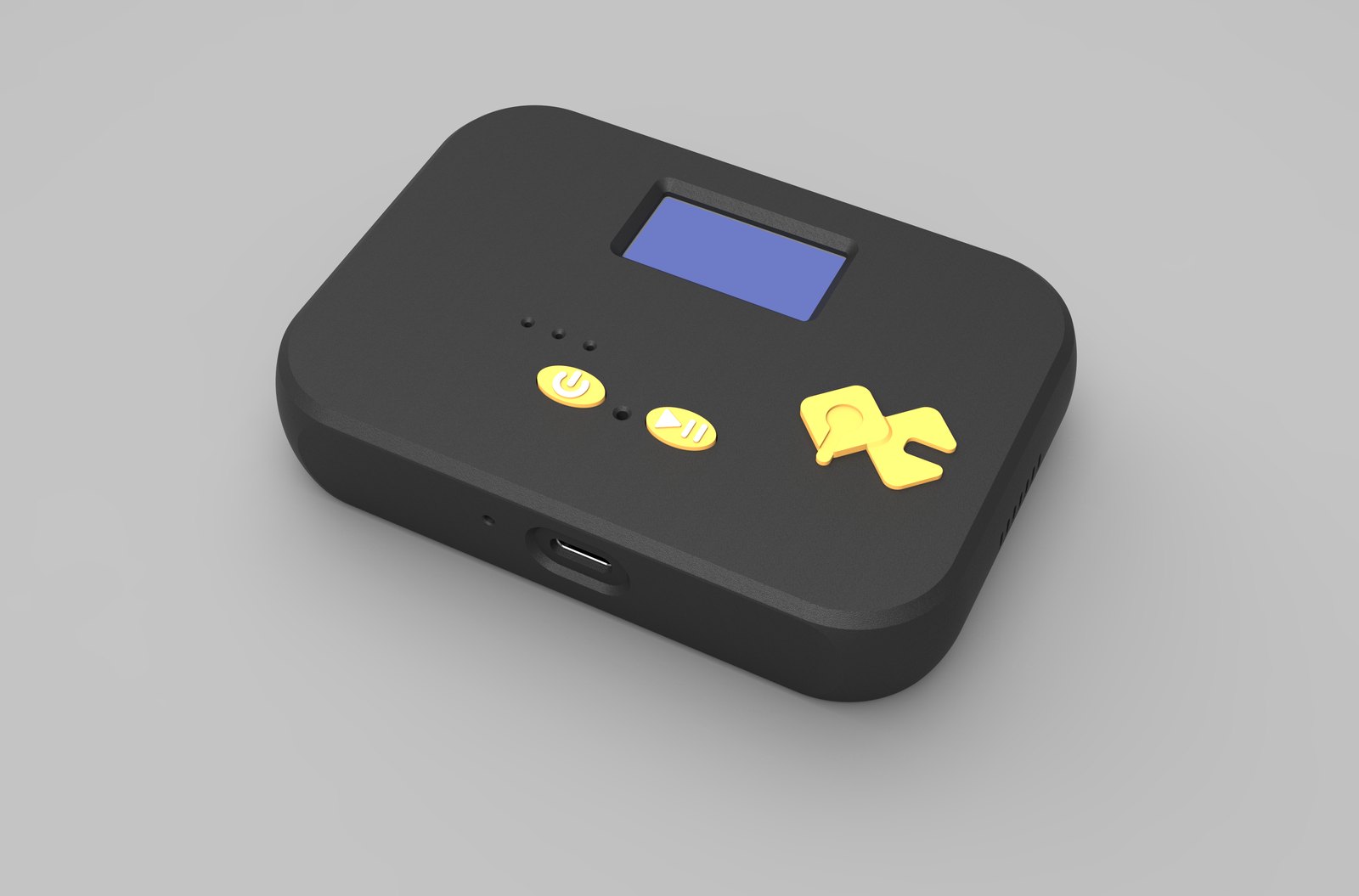
- The QuickComm Table Top is a $200 development kit for room capture, with a microphone tuned for table distance, an on-device status display, two buttons, an LED, a speaker, a 1000 mAh battery and USB-C.
- Turn framing is push to talk and silence is never streamed, so the unit is not an always listening speaker and cannot be configured into one.
- The stream endpoint is set from the console and can be a LAN address, so audio can stay on the same network as Home Assistant and your models.
- Capture is 16 kHz mono PCM through a 24-bit codec, with pre-roll buffering so the first word of a command survives the press.
- For a single room that already contains a computer, a USB microphone is cheaper and works, and this article says so plainly.
What does a room microphone for smart home voice AI have to do?
Four things, and cheap hardware usually gives up on at least two of them. A room unit has to hear someone at normal speaking volume from across a table, avoid sending the room anywhere by default, show what state it is in without anyone opening a laptop, and point at a machine the owner controls.
None of those requirements is exotic, which is what makes the gap in the market strange. Commercial smart speakers are excellent hardware attached to companies whose business is knowing what happens inside houses, and that is precisely the arrangement anyone self hosting was trying to avoid.
Hearing at table distance
A microphone designed to sit beside a mouth and a microphone designed to sit in the middle of a table are different components with different tuning. Put a headset element in a room and the result is technically audio and practically useless once speech to text has had a go at it.
The QuickComm Table Top is tuned for table distance, which is the realistic target: somebody sitting or standing near the unit, speaking normally, in a room with the usual amount of dishwasher and traffic in it. That is a genuinely different design point from a wearable, and the reason the same firmware ships in a different box.
Tuning does not repeal acoustics, though. A large open plan room with hard surfaces and a television will challenge whatever transcription you run, and where the unit sits will do more for accuracy than most people expect. Placement is free and worth an afternoon.
Why should a room microphone not stream continuously?
Because continuous listening is the requirement that rules out most of the market, and because nothing else in the design matters if the room leaves the house by default. A device sold as an assistant listens all the time by necessity, since it has to catch a wake word, and the audio it evaluates goes somewhere.
QuickComm devices work the other way around. Turn framing is push to talk, silence is never streamed, and on-device voice activity detection is the only processing that happens locally, so audio moves when somebody deliberately opens a turn and not otherwise. Pre-roll buffering keeps the start of that turn intact, which matters more for a short command than for conversation.
The industry answer to this concern is that wake word spotting now happens on the device, so nothing leaves until the word is heard. That answer asks you to trust a sealed device about the one behaviour you cannot observe. A unit that only opens a stream when a human presses a button makes the same promise in a form anyone in the room can check.
The trade is real and worth stating. A press to talk room microphone is not an always listening speaker, so calling out a command from the sofa with your hands full is not what this device does, and no configuration turns it into that.
What other people in the room can tell
A house has guests, cleaners, children and visiting relatives in it, and a microphone in a living room is something they are entitled to understand. Push to talk earns its place here beyond the technical argument, because a device that only sends audio when somebody presses a button can be explained in one sentence, and the display and LED make its state visible rather than a matter of trust.
That is a weaker guarantee than having no microphone at all, and it should be described as such. Against a sealed consumer device with an indicator light its manufacturer controls, it is a considerably stronger one.
A device that shows its own state
Debugging a headless microphone across a house is miserable. You end up standing in a hallway with a unit that may or may not be on the network, running who knows which firmware, pointed at an endpoint you configured months ago and no longer remember.
The Table Top carries an on-device status display showing network, firmware and assignment, plus an LED and a speaker. Reading what the thing believes it is connected to, while standing next to it, removes an entire evening of guesswork from any smart home voice AI project that covers more than one room.
Pointing the device at a machine on your own network
The stream endpoint is configurable from the QuickComm console, and it can be a LAN address, which is the whole point for a self hosted house. Point the unit at the same box that already runs your automation software, your transcription and your model. Locally the device can also connect over Bluetooth 5.2 (BLE).
The numbers worth knowing sit together. Wi-Fi is 802.11 b/g/n on 2.4 GHz, which is what most of a smart home already runs on. The wire protocol is udp-v1, chosen to tolerate loss rather than stall a live stream while something is retransmitted. Audio is 16 kHz mono PCM from a 24-bit codec, so your speech to text stage gets the shape it wants without a conversion step.
Once a unit is configured it streams straight to that endpoint and does not depend on the console to keep working. If the broadband drops and your models are local, the voice side of the house carries on, which is difficult to arrange with anything bought off a shelf.
Everything interesting still runs on your side, which is the arrangement you wanted. The device captures and streams; your stack chooses between Whisper and a hosted transcription service, between a local Ollama model and something larger through an API, between ElevenLabs and a local voice for the reply. Language coverage follows your models, because the device has no opinion about what is being spoken.
When is a USB microphone the better answer?
Whenever one room matters and a computer already sits in it. Buy a decent USB microphone, plug it in, and spend the difference on something else. Anyone telling you a cheap USB microphone cannot serve a single room agent is selling something.
The honest test is whether you would still want a dedicated unit after the USB microphone is working. Often the answer is no, and that is a good outcome for everybody except the vendor.
The case for separate hardware appears when constraints stack rather than when any single one bites.
- Rooms with no computer in them, where a USB microphone would mean putting a machine in a hallway.
- More than two or three rooms, where identical units configured the same way beat a collection of improvised setups.
- Places where a cable is unwelcome, which is what the 1000 mAh internal battery and USB-C charging are for.
- A wall position rather than a desk, since the Table Top is built to sit in either.
What this hardware does not do
No AI runs on the Table Top. On-device processing stops at voice activity detection, so transcription, intent, automation and the spoken reply all happen on the machine you point it at, and the uptime of that machine is yours to worry about.
No ingress protection rating is claimed, so a bathroom or a garden is not the intended home for one. Wi-Fi is 802.11 b/g/n on 2.4 GHz only. Capture is 16 kHz mono PCM only, a single channel with no separation between people talking over each other. The 12-month warranty excludes physical damage and returns run for 7 days.
Audio quality also follows the source, so a noisy room stays a noisy room. And anyone who wants a finished voice assistant they can plug in and speak to should not buy this kit at all: the Table Top is sold to people who already run a stack or intend to write one, and it does nothing on its own.
Common questions
Does the Table Top work with Home Assistant?
The Table Top streams framed audio to whatever endpoint you configure, including a machine on your own LAN, so integration is a matter of what you run on that machine rather than a feature of the device. Builders typically place transcription and intent handling beside their existing automation setup and treat the unit as one more source of speech.
Can it listen for a wake word?
Not on the device. QuickComm hardware frames turns with push to talk and never streams silence, so a wake word engine would have to run in your own stack on audio somebody already chose to send. Anyone whose smart home voice AI plan depends on shouting across a room should look at a different class of product.
How many units does a house usually need?
One per room where speech actually happens, which for most houses means two or three rather than one per doorway. Volume discounts begin at 5% for five or more units, so the arithmetic only changes for larger houses and offices.
Building with the QuickComm Table Top
The Table Top is a development kit at $200: a room tuned microphone, a status display, two physical buttons, an LED, a speaker, a 1000 mAh battery and USB-C, pre-flashed with QuickComm firmware and pointed at an endpoint you set from the console rather than one compiled in.
Units are built to order and ship in 10 days worldwide, with 7-day returns if the thing turns out not to suit the house. For a smart home voice AI setup where the models are already yours, the Table Top is the piece that keeps the microphone yours as well.