voice AI hardware
Five project patterns for voice AI hardware
Five project patterns for voice AI hardware, from a wearable assistant to a radio bridge, with the device that fits each and the limits worth knowing.
July 29, 2026 10 min read
Most voice projects hit the same wall in the same week. The model answers well, the tools fire, the voice sounds right, and the whole thing still only exists in front of a laptop. Voice AI hardware is what moves a working stack to the place where people actually speak, and choosing it starts with being honest about which of a small number of project shapes you are really building.
Voice AI hardware, in the sense used here, means a device that captures speech, frames it into turns and streams it to an endpoint the buyer configures, while speech to text, the model, any wake word and text to speech all run on the buyer's own backend. QuickComm publishes this article and sells three such devices as development kits.
The short version
- QuickComm sells three development kits: the Earpiece at $350, the Table Top at $200 and the Bridge Node at $250, all pre-flashed and built to order.
- All three capture 16 kHz mono PCM through a 24-bit codec, frame turns with push to talk, buffer pre-roll so the first syllable is never clipped, and never stream silence.
- Every device streams to whatever endpoint the buyer configures, so transcription, wake words, models and text to speech all run on the buyer's own backend.
- The five patterns builders keep returning to are a wearable personal assistant, room capture, a bridge onto radios a site already runs, a counter agent, and a small multi device site.
- No inference runs on the device beyond voice activity detection, so how good and how fast a project feels follows the buyer's architecture rather than the hardware.
What do builders actually make with voice AI hardware?
Five shapes cover most of it: a wearable personal AI assistant, room capture for a home or office agent, a bridge onto radios a site already runs, a counter or front desk agent, and a small multi device setup across one site. Each of the five is a project pattern, not a case study.
QuickComm names no customers and reports no deployments, so nothing below is dressed up as one. The patterns follow from what the three devices are physically shaped to do.
| Pattern | Device that fits | Price |
|---|---|---|
| Wearable personal assistant | QuickComm Earpiece | $350 |
| Room capture for a home or office agent | QuickComm Table Top | $200 |
| Bridge onto radios, intercoms or desk phones | QuickComm Bridge Node | $250 |
| Counter or front desk agent | QuickComm Table Top | $200 |
| Small multi device setup across one site | A mix of all three | From $200 per unit |
Pattern one: a personal AI assistant you wear
The problem here is availability. An assistant that only works while you sit at the machine running it is a browser tab, and the moments when you most want to ask something are usually the moments your hands are full.
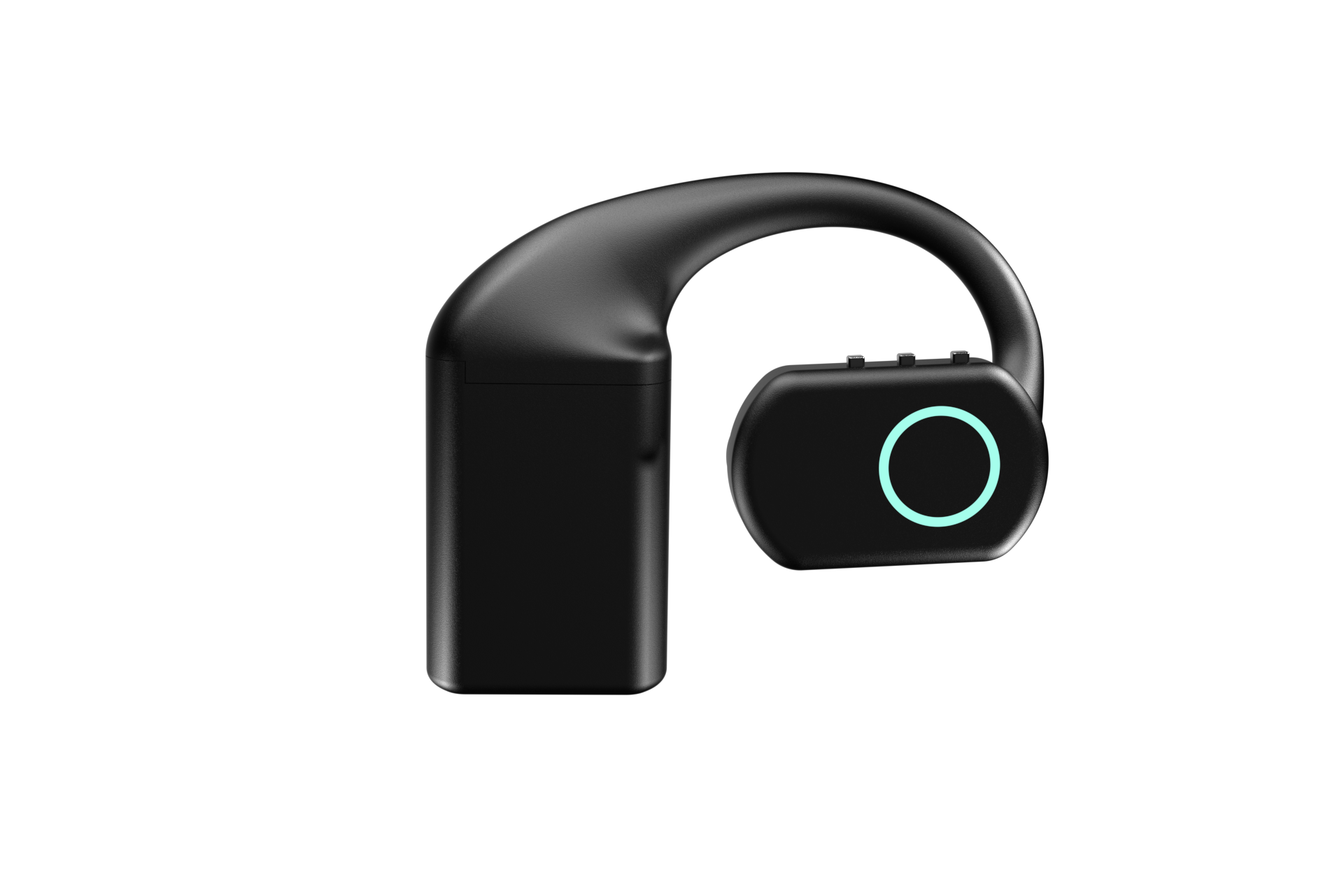
The QuickComm Earpiece fits that shape at $350. Over-ear, MEMS microphone, integrated speaker, RGB LED, three physical buttons with no touch surface, and three hot-swap 700 mAh battery packs at roughly 8 hours each and roughly 24 hours combined, with a charging dock that holds its own charge.
You still build everything above the audio. The Earpiece opens a turn when the wearer presses, sends pre-roll ahead of the live stream so the first syllable survives, and pushes 16 kHz mono PCM to your endpoint. Your backend runs the transcription, the model, the memory and the reply, whether that means OpenAI Realtime, Whisper feeding a local Ollama model, or Deepgram feeding ElevenLabs.
The honest limit is that push to talk is not always listening. A press removes an entire class of false trigger and also removes the trick of calling out across a room, so decide which of those two behaviours you actually want before ordering.
Pattern two: room capture for a home or office agent
Room capture solves a different problem: the speaker is metres away rather than centimetres, and everyone else in the room can see the microphone.
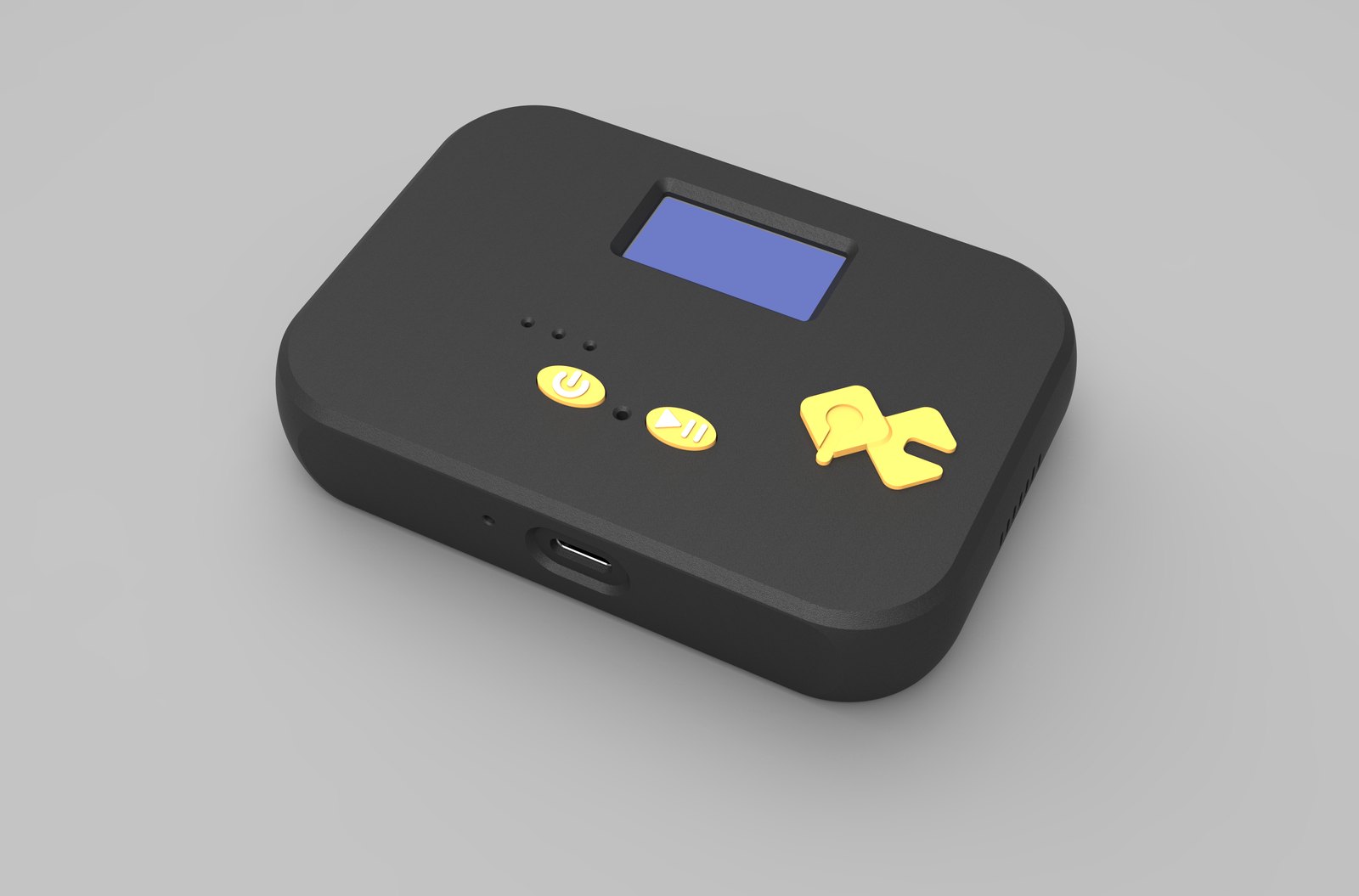
The QuickComm Table Top fits at $200. Desk or wall mounted, microphone tuned for table distance, an on-device status display showing network, firmware and assignment, two physical buttons, an LED, a speaker, a 1000 mAh internal battery and USB-C.
What you build is the endpoint the unit points at, which over Wi-Fi can be a LAN server. Home Assistant users tend to put transcription, model and automation on the box that already runs the house, then treat the Table Top as one more source of intents.
A concession before anyone spends money: if the whole project lives at one desk, the microphone in the laptop already running your stack costs nothing and is good enough. Dedicated hardware earns its price when the audio has to come from a place the computer is not.
Pattern three: a bridge onto radios a site already runs
Plenty of sites already have a working voice network that is not on the internet. Two-way radios, radio headsets, intercoms, PA systems, desk phones and consoles all carry speech around a building perfectly well, and replacing any of it to add an agent is a non-starter.
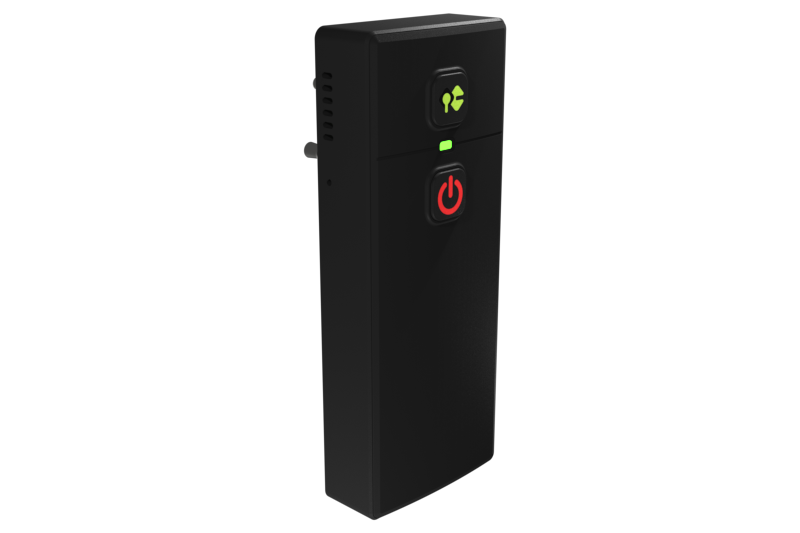
The QuickComm Bridge Node fits at $250. A belt-clip unit that plugs into any 3.5 mm or 2.5 mm two-pin audio jack, two-way so it carries both microphone and speaker, sitting inline so the host device keeps working exactly as before, with an on-device display and USB-C.
Radio audio then arrives at your backend as the same 16 kHz mono PCM every other QuickComm device sends, and what happens next is entirely your design: transcription, an agent that answers back down the channel, or a quiet log of what was said.
The limit is blunt. Audio quality follows the source, and a radio channel is a narrow, noisy source. Your speech to text sees what the radio delivered, not what the speaker said, and no capture device repairs that.
Pattern four: a counter or front desk agent
A counter is a fixed place where the same short exchanges repeat all day, which makes it one of the easier places to put an agent to work. The speech is predictable, the acoustics never change, and there is mains power within reach.
The Table Top suits a counter for the same reasons it suits a room, with the display doing extra duty. Staff can see whether the unit is on the network and which assignment it is running, which matters when the operator is not the person who configured it.
Two limits deserve saying out loud. Retail sites are crowded on 2.4 GHz and the Table Top is a 2.4 GHz device, so survey the network before ordering ten. And anyone speaking to a counter agent should be able to tell when a turn is open, which is what the button, the LED and the display are for.
How do several devices work across one site?
Each unit is provisioned by QR code and configured from the console in three steps, then streams directly to the endpoint you set. Adding a fifth device is the same three steps again rather than a new architecture.
Across a site that usually means a mix: Table Tops in the rooms that matter, an Earpiece on whoever moves between them, a Bridge Node on the radio channel. All of them send the same audio to the same backend, so the difference between one device and ten lives in your code rather than theirs.
OTA firmware updates, remote commands and health telemetry exist for this pattern in particular. Once a unit is configured it streams to your endpoint without depending on the console to operate, so a console nobody is logged into is not an outage.
The commercials group neatly at this scale. Volume discounts run 5% at 5 or more units, 10% at 10, 15% at 25 and 20% at 50, shipping is free over $2,000, there are no per-channel fees and no platform lock-in, and the buyer pays import duties on delivery.
What does every pattern leave you to build?
All of the intelligence, in all five cases. The device supplies framed audio and nothing else, and the difference between a project people enjoy using and one they abandon is decided upstream in the backend you write.
- On the device: capture at 16 kHz mono PCM, push to talk turn framing, pre-roll buffering, on-device voice activity detection, speaker and LED output, QR provisioning, OTA firmware updates, remote commands and health telemetry.
- In your stack: speech to text, any wake word you want, the model, memory, tools, text to speech, language coverage and every judgement about what an utterance actually means.
A belief worth arguing with sits underneath all of this. The common view is that voice AI hardware is the easy half of a project and the model is the hard half. For anything worn, mounted or clipped onto a radio the reverse is closer to true, because the model is a paid API call while the capture layer is a battery, an antenna, a button and a microphone that all have to keep working in a room you do not control.
The device decides when audio leaves the room. Everything about what that audio means is decided in code the buyer owns.
What this hardware does not do
- No AI runs on the device. On-device processing stops at voice activity detection, and every transcript, decision and reply comes from the buyer's backend.
- No ingress protection rating is claimed, so none of the three units should be treated as sealed against water or dust.
- Wi-Fi is 802.11 b/g/n on 2.4 GHz only, ordinary in a house and crowded on a busy commercial site.
- Capture is 16 kHz mono PCM only. One channel, one stream, and no separation of speakers at the capture layer.
- The 12-month warranty excludes physical damage, and returns run for 7 days.
- The buyer owns the backend, its uptime and its bills. A device with nothing listening at the far end does nothing.
- Audio quality follows the source, which bites hardest on the Bridge Node, where the source is a radio channel rather than a room.
Anyone looking for a finished assistant should not buy any of the three. QuickComm sells development kits to engineers, indie developers and startup teams who already run a voice stack or intend to write one, and a buyer without a backend has a microphone with nowhere to send audio.
Common questions
Do QuickComm devices transcribe what people say?
No. QuickComm devices capture speech and stream 16 kHz mono PCM to a configured endpoint, and nothing more. Transcription happens wherever the buyer points that stream: Deepgram, a Whisper deployment, a hosted realtime model or something on a machine in the next room.
Can one backend serve all three devices at once?
Yes, and that is the usual arrangement on a multi device site. The Earpiece, Table Top and Bridge Node share the same firmware behaviour, capture format and udp-v1 wire protocol, so a backend written for one already understands the others.
What happens to a device if the console is unavailable?
A configured QuickComm device keeps streaming to the buyer's endpoint. The console holds provisioning, endpoint configuration, firmware updates and the documentation, but sits outside the audio path once setup is done, so a device in service does not depend on it.
Where to start with voice AI hardware
Pick the pattern that describes your project, order a single unit of the device that fits it, and write the smallest backend that proves the loop end to end. Patterns get expensive when they are bought at scale before the first turn has arrived.
Every kit is built to order and ships in 10 days worldwide, arrives pre-flashed, and comes with documentation in the console and a builders community on Slack. The second order is where volume pricing and multi device thinking start to matter.